Last updated November 2026
Most Whanganui businesses that commission a new website end up choosing between two platforms, often without realising a choice is being made. WordPress runs a large share of the sites you already know, from trade businesses to community trusts. Webflow is newer, and more local studios now build on it. Both can produce a fast, good-looking site. Where they differ is in who looks after the site once it is live, how much it can grow, and how easily you can make changes yourself. This guide sets out those differences in plain terms so you can ask a designer the right questions before you sign off a quote.
★View the Best Web Design in Whanganui→What Webflow and WordPress Actually Are
WordPress is free, open-source software. It has to be installed on a web host, and the site is extended with themes and plugins written by thousands of different developers. That openness is its strength: there is a plugin for almost anything, and any developer can pick up the site later.
Webflow is a hosted platform. You pay a subscription, and Webflow runs the servers, the security certificates and the software updates. A designer builds the site visually in Webflow’s own editor, which writes the code underneath, and the business owner gets a simpler editing screen for day-to-day changes.
So the real question is not which one is better. It is whether you would rather own and maintain the software yourself, or rent a platform that maintains itself.
Webflow and WordPress Side by Side
Hosting
- Webflow
- Included in the Webflow subscription
- WordPress
- Arranged separately with a host of your choice
Updates and security
- Webflow
- Handled by the platform
- WordPress
- Core, theme and plugin updates need to be applied regularly
Design freedom
- Webflow
- Built from scratch visually, no theme needed
- WordPress
- Usually built on a theme or page builder, fully custom if coded
Add-ons
- Webflow
- A smaller set of apps and integrations
- WordPress
- Tens of thousands of plugins
Editing by the owner
- Webflow
- A simplified editor for text, images and CMS items
- WordPress
- The full dashboard, which can be a lot for a casual user
Moving away later
- Webflow
- Possible, but the site is tied to the platform
- WordPress
- Straightforward to move to another host or developer
When Webflow Tends to Suit
Webflow fits the kind of website most Whanganui service businesses need: a clear set of pages, a contact form, perhaps a news or projects section, and a design that looks like the business rather than a theme. A builder, a medical practice, a law firm or a club usually wants exactly that, and wants it to keep working without anyone thinking about plugin updates.
- You want low maintenance. There is no plugin list to keep current, which removes one of the most common reasons small business sites break or get hacked.
- Design matters to you. Because the site is built from a blank canvas, it can follow your branding closely instead of bending a theme to fit.
- Several people will update it. Webflow’s editor lets staff change text, swap images and add CMS items such as staff profiles or project pages without touching the layout.
When WordPress Tends to Suit
WordPress earns its place where a site needs functions that Webflow does not offer, or where the business wants complete control of the code and hosting.
- A large online shop with complex shipping, stock or wholesale pricing rules, where a WooCommerce plugin already exists for the job
- Membership sites, booking systems or directories that rely on specialised plugins
- Very content-heavy sites with many authors and editorial workflows
- A business that already has an in-house person or a support agreement covering updates and backups
The trade-off is upkeep. A WordPress site is only as safe as its last update, and an unpatched plugin is a common way in for attackers. If you choose WordPress, budget for someone to maintain it, and ask your designer who that will be.
Questions to Ask a Whanganui Web Designer
Most local studios have a favourite platform, and that is not a bad thing. A designer who builds on one platform every week usually builds it well. What you want is a clear explanation of why that platform suits your business, not just a habit. Before you agree a quote, ask:
- Which platform do you recommend for this site, and why?
- Who will own the hosting account, the domain and the site itself?
- What will I be able to update myself, and is training included at handover?
- What are the ongoing costs each year, including hosting, subscriptions and maintenance?
- If I move to another designer later, what do I take with me?
On ownership, make sure the domain name is registered to your business rather than the designer. The Domain Name Commission explains the rules for .nz names and how to check who the registrant is.
A Note on Privacy and Contact Forms
Whatever the platform, a website that collects names, emails or phone numbers through a form is collecting personal information. Under the Privacy Act, your business should say what it collects and how it is used. The Office of the Privacy Commissioner has free guidance and a privacy statement generator for small businesses. Ask your designer to include a privacy page as part of the build rather than leaving it for later.
Where Inferno Design and Digital Fits
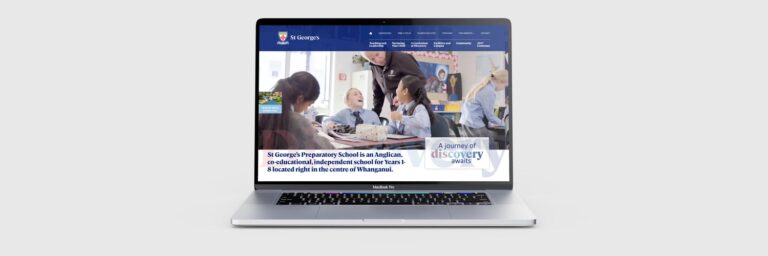
Inferno Design and Digital is a design studio on Guyton Street, founded by graphic designer and Webflow developer Jeff Croot. The studio builds its websites in Webflow where it can, from the ground up rather than from templates, and covers e-commerce, CMS setup, handover and ongoing maintenance. Its portfolio includes sites for Whanganui organisations such as St George’s School, Keown Honda and Whanganui Osteopathy, and the same studio handles branding and print, so the website can be planned alongside a logo or brochure. If you are weighing up platforms, the questions above are a good place to start the conversation.